Off-Chain Workers Deploy
The off-chain worker supports Unit by providing price data and acting as a transaction validator.
Environment Setup
Connect to GCP and change directories to your projects folder and clone offchain-workers.
git clone git@github.com:UnitCode-org/offchain-workers.git
Redirect within offchain-workers repo.
cd offchain-workers/
Update apt package manager.
sudo apt update
Install nvm, The Node Version Manager.
nvm can install Node.js and be used to easily change your machine's Node.js version.
If you want to audit the script first, run this command, which is simply the install script without | bash.
curl -o- https://raw.githubusercontent.com/nvm-sh/nvm/v0.39.1/install.sh
Script to download and execute nvm.
curl -o- https://raw.githubusercontent.com/nvm-sh/nvm/v0.39.1/install.sh | bash
To use nvm, you must first source your .bashrc file.
source ~/.bashrc
Use nvm to check which versions of Node.js are available.
nvm list-remote
Install this version of Node.js or later.
nvm install v18.19.0
Check Node.js version.
node -v
Remove previous dependencies to avoid conflicts: cmdtest package.
sudo apt remove cmdtest
Remove any previously installed version of yarn.
sudo apt remove yarn
Download the GPG key for the Yarn package repository using curl.
Pipe (|) the downloaded key to sudo apt-key add -, which add the GPG key to your system's list of trusted keys. This ensures that the packages downloaded from the Yarn repository are trusted.
curl -sS https://dl.yarnpkg.com/debian/pubkey.gpg | sudo apt-key add -
Add the Yarn package repository to your system's list of package sources:
echo "deb https://dl.yarnpkg.com/debian/ stable main" | sudo tee /etc/apt/sources.list.d/yarn.list
Update your system's package index, fetching the latest package information from all configured sources, including the newly added Yarn repository. This ensures that you can install the latest version of Yarn.
sudo apt-get update
Install Yarn from newly added repository.
sudo apt-get install yarn -y
Remove node_modules.
rm -rf node_modules
Remove any .lock files.
rm package-lock.json
rm yarn.lock
Verify that Yarn is installed correctly.
yarn --version
Install all dependencies listed in the package.json file of your project using Yarn. This will read the package.json file and download the specified packages into the node_modules directory.
yarn install
Install pm2, a powerful Production Manager for Node.js apps.
yarn global add pm2
Worker Setup
Prerequisites
To setup a worker, you should have a Unit account funded with Unit tokens. To create a Unit account, you need to use an invite link. The inviter has a limited amount of invitees they can invite, which they choose to set. When they set the number of available invitees, they automatically transfer a small amount of Unit tokens in a Unit pool, which will be used to cover the fees of their invitees' first transactions inside Unit. Bellow are the steps to create an account, acquire Unit tokens and increace the number of invitees.
Account Creation
- Register an account in Unit using the username of the inviter, following the steps outlined in Register an Account Guide.
Acquire Unit
- Deposit crypto into Unit system following the Deposit Guide.
- Buy Unit tokens using wrapped crypto following the Sales Guide.
Testing mode
Increase the Number of Invitees
If you own the Unit admin (sudo) account, you should increase the number of available invitees before creating a worker account by following the next steps:
- Add your keys to PolkadotJS using this guide
-
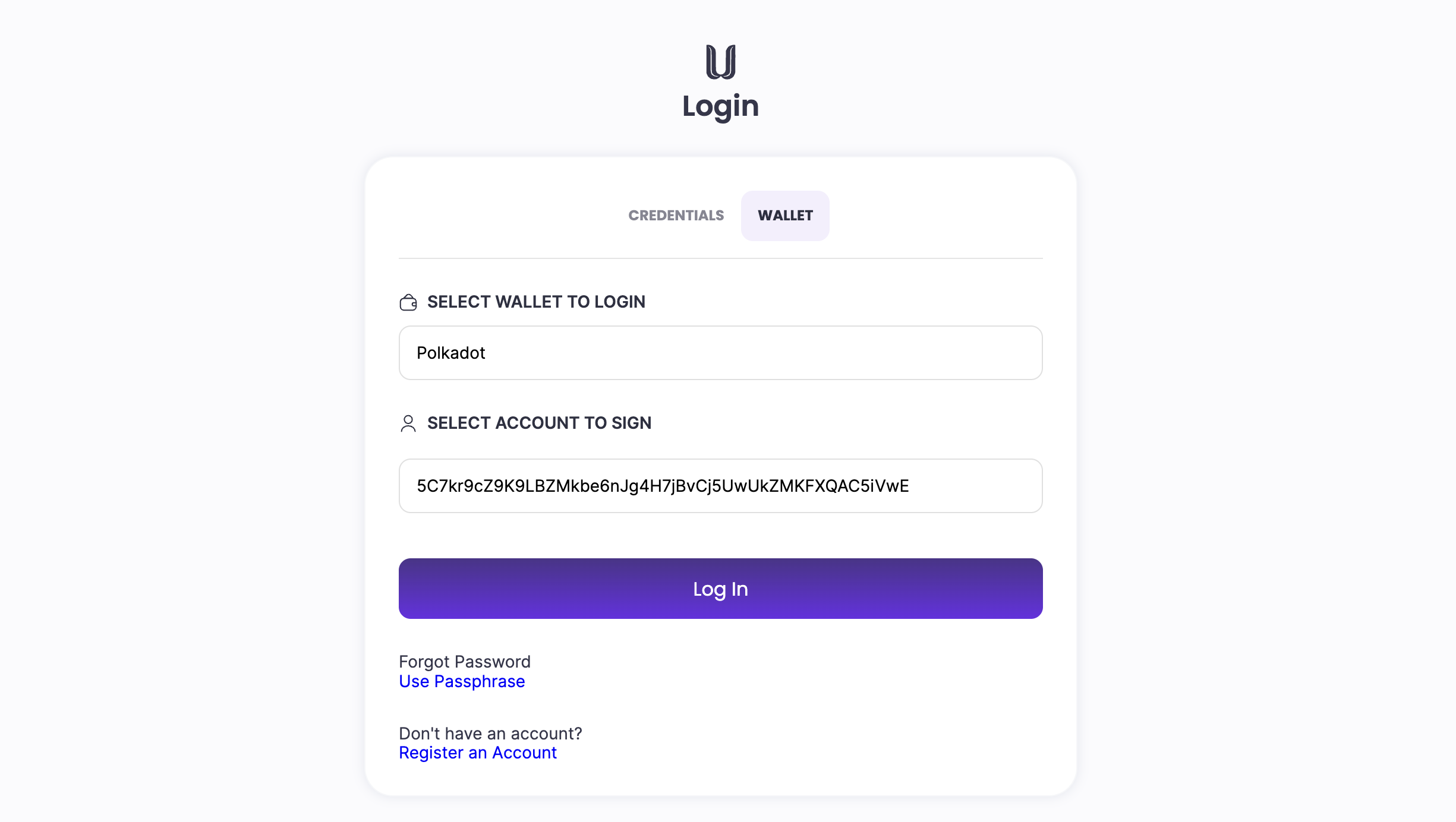
Log into Unit Network using the Wallet method and the PolkadotJS extension with the account you created in the previous step and follow the Invite Quota guide.
-
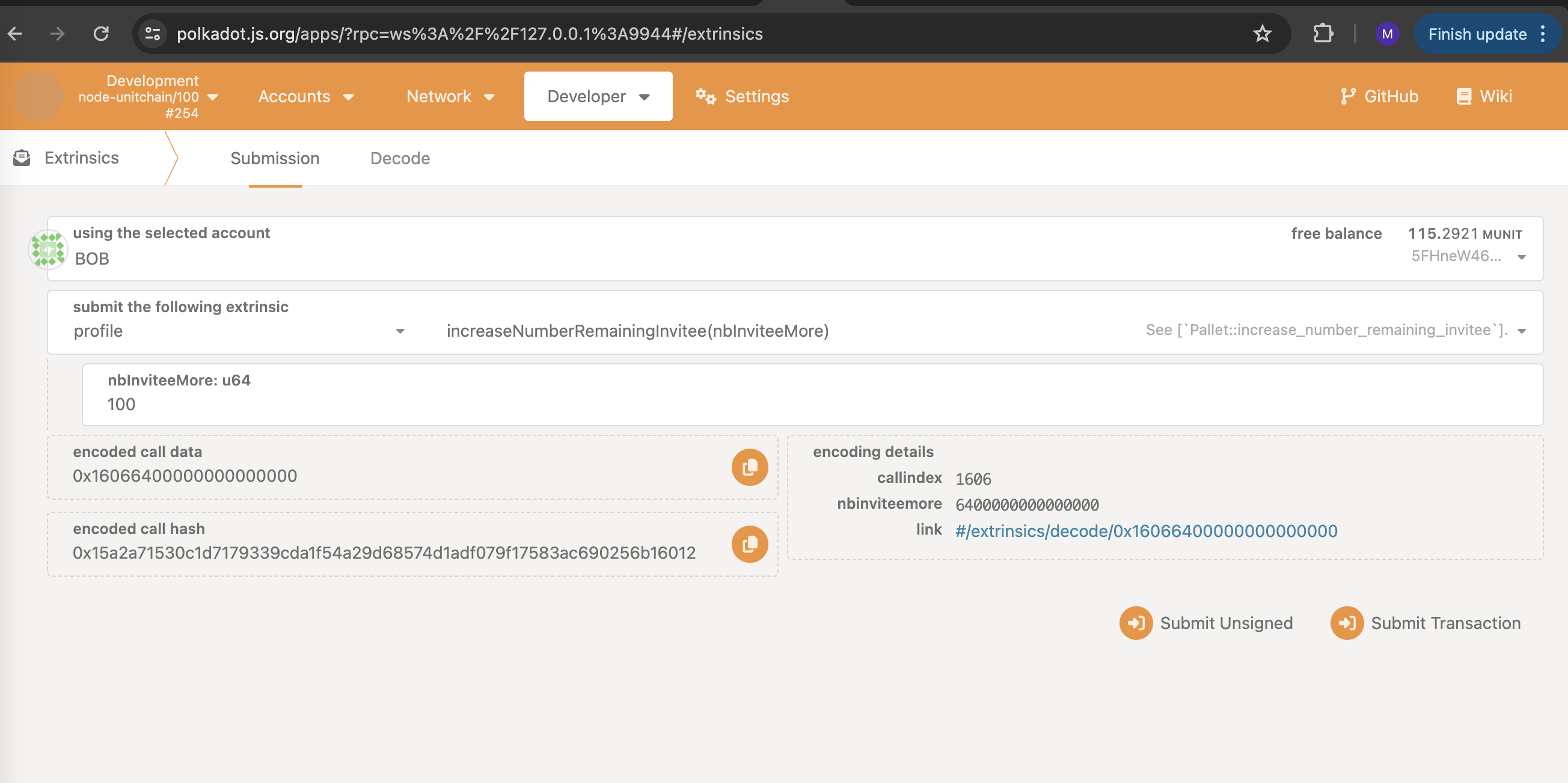
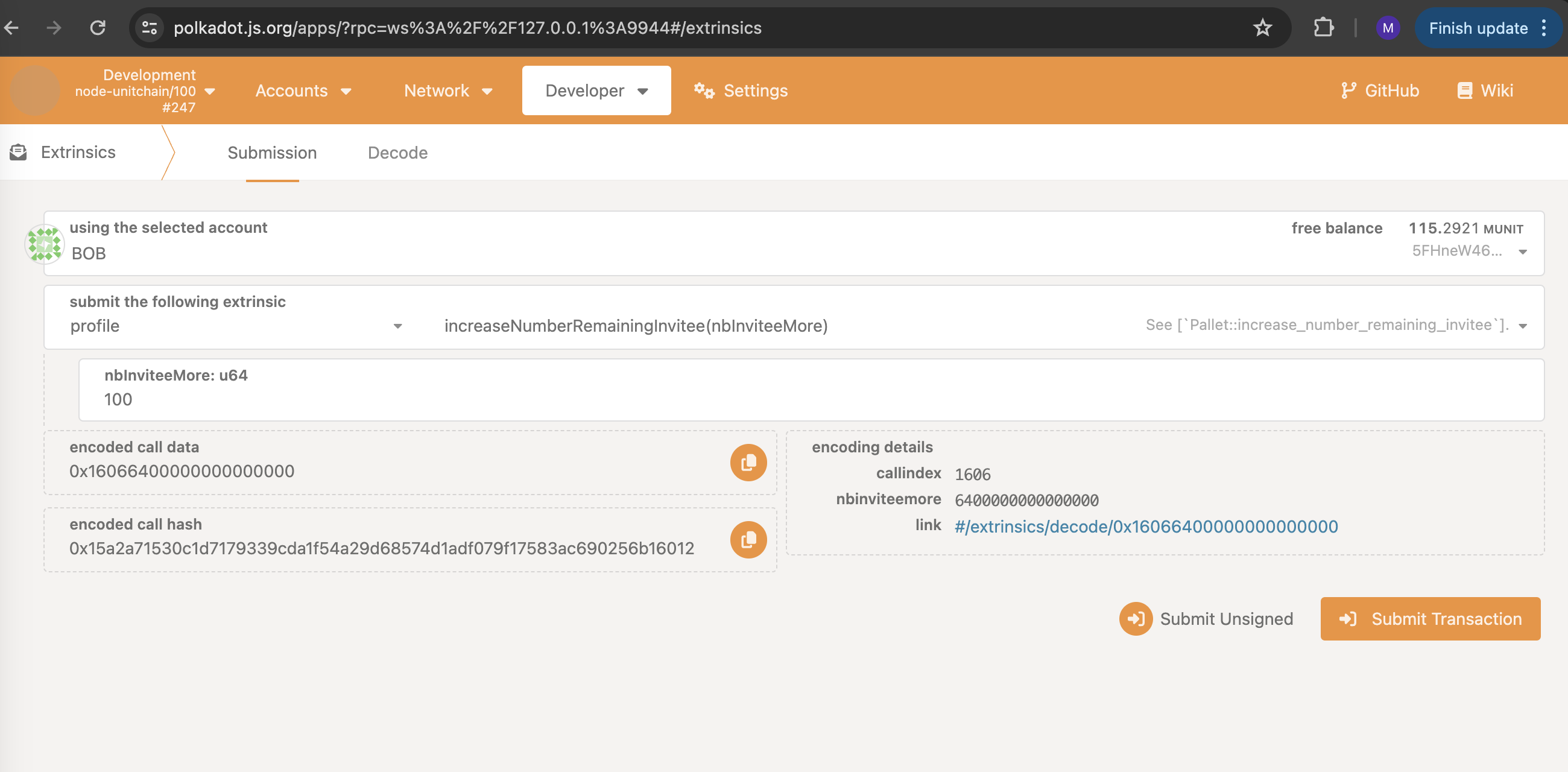
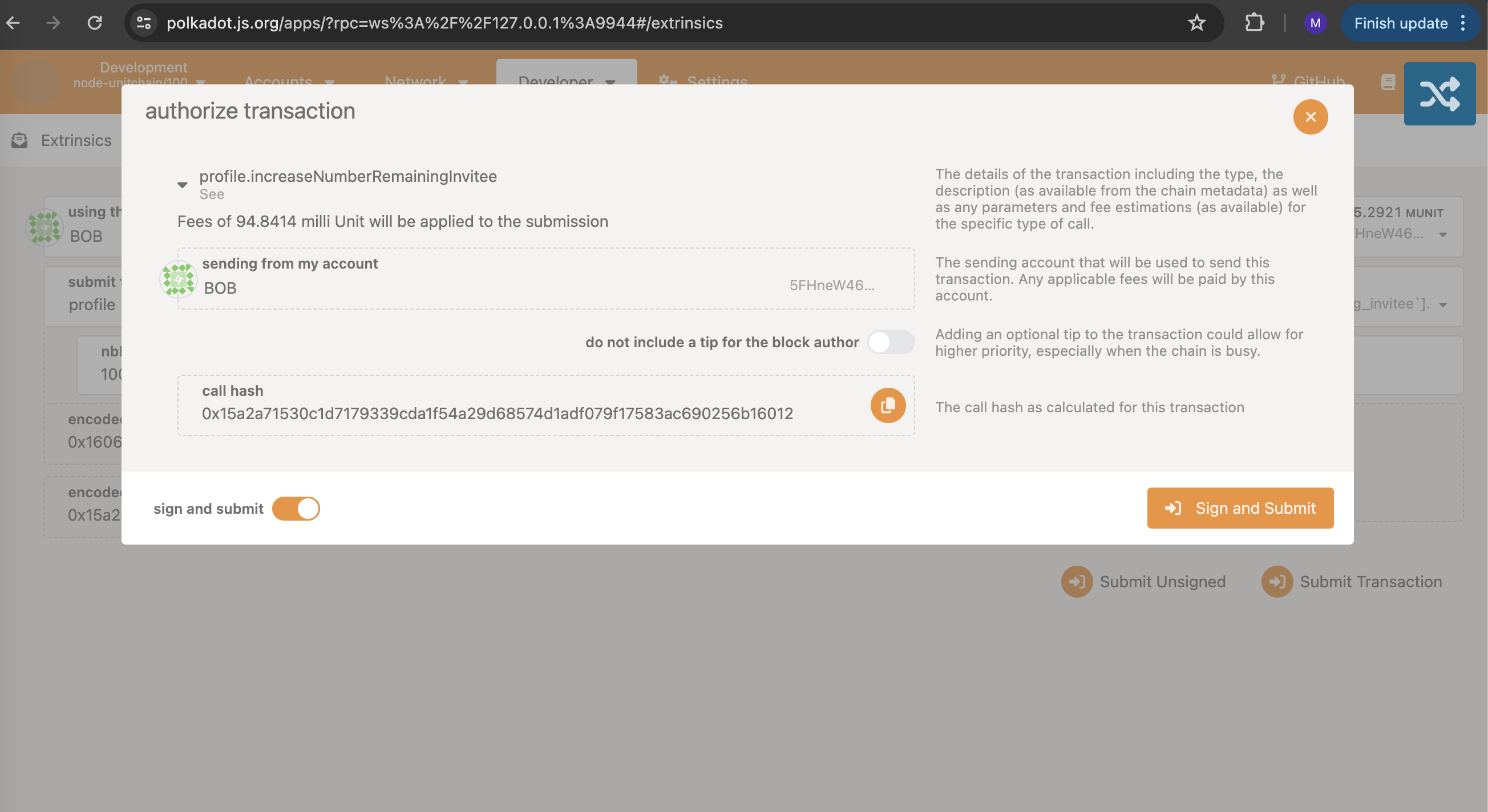
Alternatively, visit the PolkadotJS extrinsics page (Developer -> Extrinsics), select the "unit" account in the 'using the selected account' tab, choose the profile module in the 'submit the following extrinsic' and 'increaseNumberRemainingInvitee(nbInviteeMore)' and enter the desired amount of invitees in the 'nbInviteeMore' input field. Click 'Submit Transaction', click 'Sign and Submit' in the popup, and wait for the transaction confirmation.
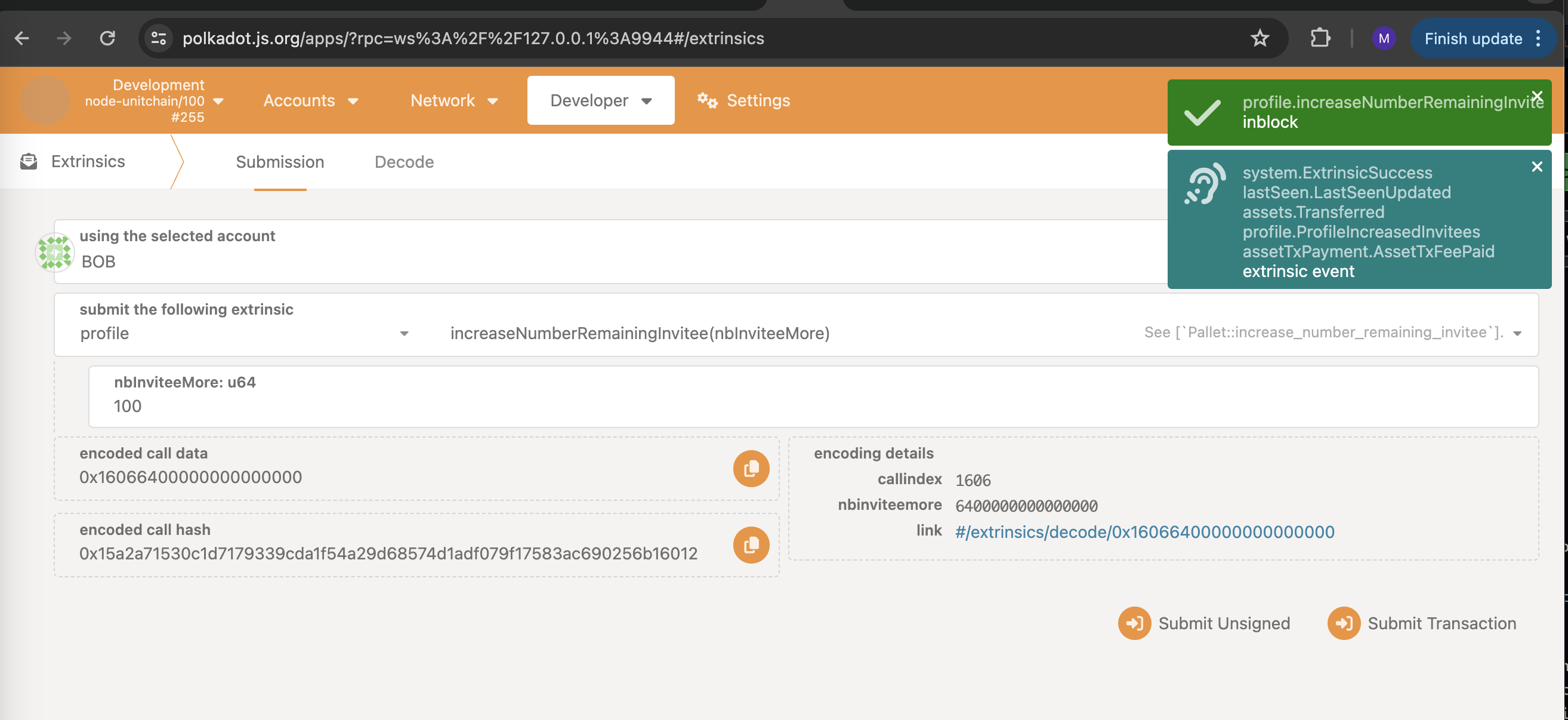
-
API Setup
Prices API Keys
Coingecko Key (COINGECKO_API) (optional)
Visit the CoinGecko API page to setup a pro-api key
Note: Used for crypto prices
Currency Key (CURRENCY_API)
Visit the Currency API page, register and access an api key
Note: Used for fiat prices
Currency Beacon Key (CURRENCY_BEACON_API_KEY)
Visit the Currency Beacon API page, register and access an api key
Note: Used for fiat prices
Exchange Rate Key (EXCHANGE_RATE_API_KEY)
Visit the ExchangeRate API page, register and access an api key
Note: Used for fiat prices
Crypto Compare Key (CRYPTO_COMPARE_API_KEY)
Visit the CryptoCompare API page, register and access an api key
Note: Used for crypto prices
CoinMarketCap Key (COIN_MARKET_CAP_API_KEY)
Visit the CoinMarketCap page, register and access an api key
Note: Used for crypto prices
Transaction Verifiers API Keys
EtherScan (ETHERSCAN_API_KEY)
Visit the EtherScan API page, register and access an api key
PolygonScan (MATIC_API_KEY)
Visit the following page, register and access an api key PolygonScan aPI
BSCScan (BNB_API_KEY)
Visit the BSCScan page, follow the steps and access an api key
Solana Beach (SOLANA_API_KEY)
Visit the Solana Beach API page, follow the steps and access an api key \
Environment Setup
Change directories to offchain-workers and create a .env file if one does not already exist.
sudo nano .env
Include in the .env file the correct API endpoints, API keys and the credentials of the worker.
# Rename .env.example file to .env
# Complete the credentials used to login in UNIT Network
EMAIL=tester@test.com
PASSWORD=tester@test.com
PIN=tester@test.com
# Endpoint
# HOST=wss://Mozart.network
HOST=ws://127.0.0.1:9944
# Price API keys
# free coingecko api
# COINGECKO_API=https://api.coingecko.com/api/v3/coins/markets?vs_currency=usd&order=market_cap_desc&per_page=100&page=1&sparkline=false
# pro coingecko api
COINGECKO_API=https://pro-api.coingecko.com/api/v3/coins/markets?vs_currency=usd&order=market_cap_desc&per_page=100&page=1&sparkline=false&x_cg_pro_api_key=CG-Zx8NBankYcZefuKRjR539JUs
COINGECKO_PRICE_CHANGE_API =https://pro-api.coingecko.com/api/v3/simple/price/x_cg_pro_api_key=CG-Zx8NBankYcZefuKRjR539JUs
# CURRENCY_API=https://api.currencyapi.com/v3/latest?apikey=UAKucSCKNpcwU43kQWLliKno3NgpeV7HcLJt
CURRENCY_API=https://currencyapi.net/api/v1/rates?key=UAKucSCKNpcwU43kQWLliKno3NgpeV7HcLJt
CURRENCY_BEACON_API_KEY=IEa8irBhLoM2CsusaGi2UUlxD1Ib0w2H
EXCHANGE_RATE_API_KEY=37ebadb8694b29ee02f897bc
CRYPTO_COMPARE_API_KEY=3f728494c88212acfdad60d8ca8b91e1638aa92ba2cf58b5d2c193cb68d31dfb
COIN_MARKET_CAP_API_KEY=6214f8a3-f575-4922-84e9-eadbe0b3e4f2
# Transaction verifiers API keys
ETHERSCAN_API_KEY=7KT9JFYWU7UIGBUH4TV4QF21PTCE4W7UPN
MATIC_API_KEY=WAYUXRIMPVN3GY8ZH4HKUHPISYSJWXCIVG
BNB_API_KEY=F9DCZXPFXF66YMK4XEG9REDDPZJ1EG86NF
SOLANA_API_KEY=5b94ad40-8bbc-4c3e-9896-4b944f1ae995
Start off-chain workers and make sure it works.
The Off-Chain Worker (OCW) CLI is a command-line interface tool for managing registration, unregistration, and other functionalities of the OCW system.
CLI Functionalities
- Registration: Register as a worker.
- Unregistration: Unregister as a worker and stop working.
- Getting Back Your Funds: Retrieve your staked funds after unregistration.
- Increasing Your Staked Amount: Increase the amount of Unit staked.
- Starting The Worker: Start the off-chain worker process.
- Quitting The Worker: Stop the off-chain worker process.
- Providing Worker-Related Information: View worker-related information.
- Providing CLI-Related Help: (pending)
- Exiting CLI: Quit the CLI.
Open the CLI tool, use the following command:
yarn start
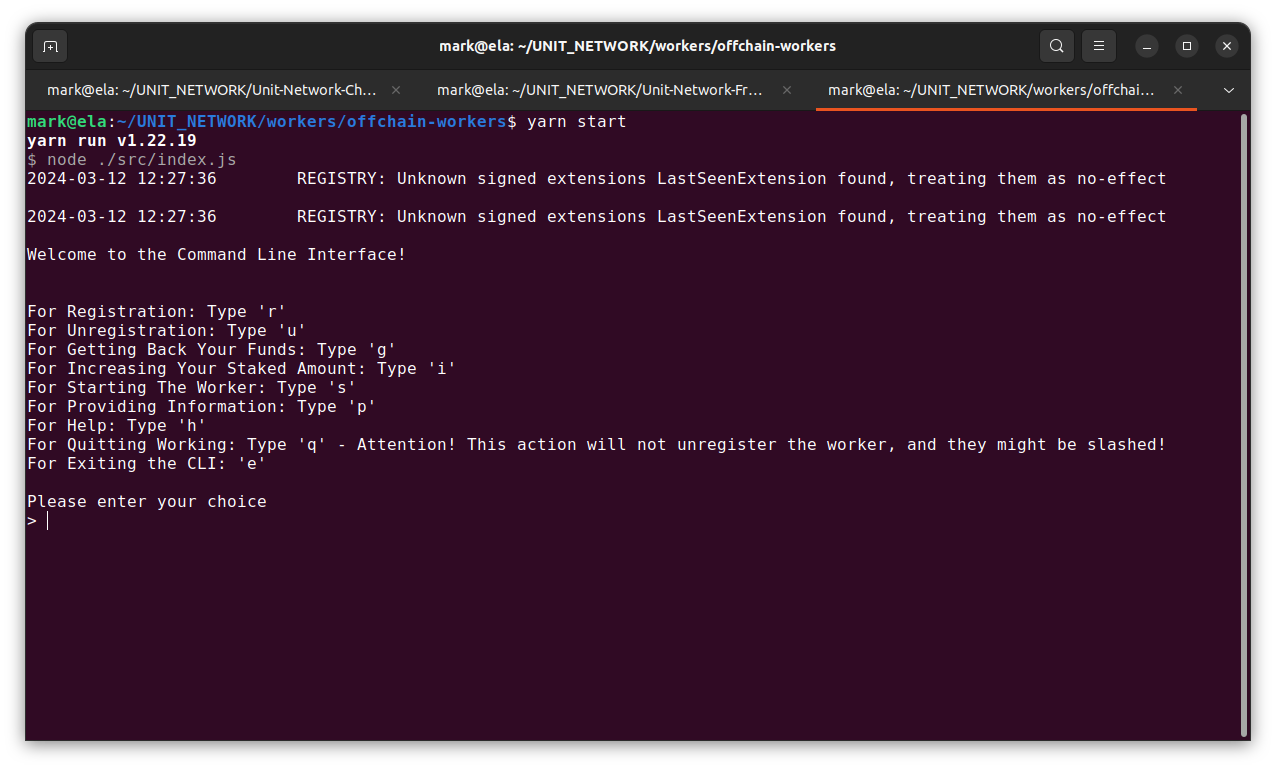
Register worker, type r and enter the initial amount to stake:
> r
Please enter the initial amount to stake
> 4500

Command to view the current status of the worker:
> p
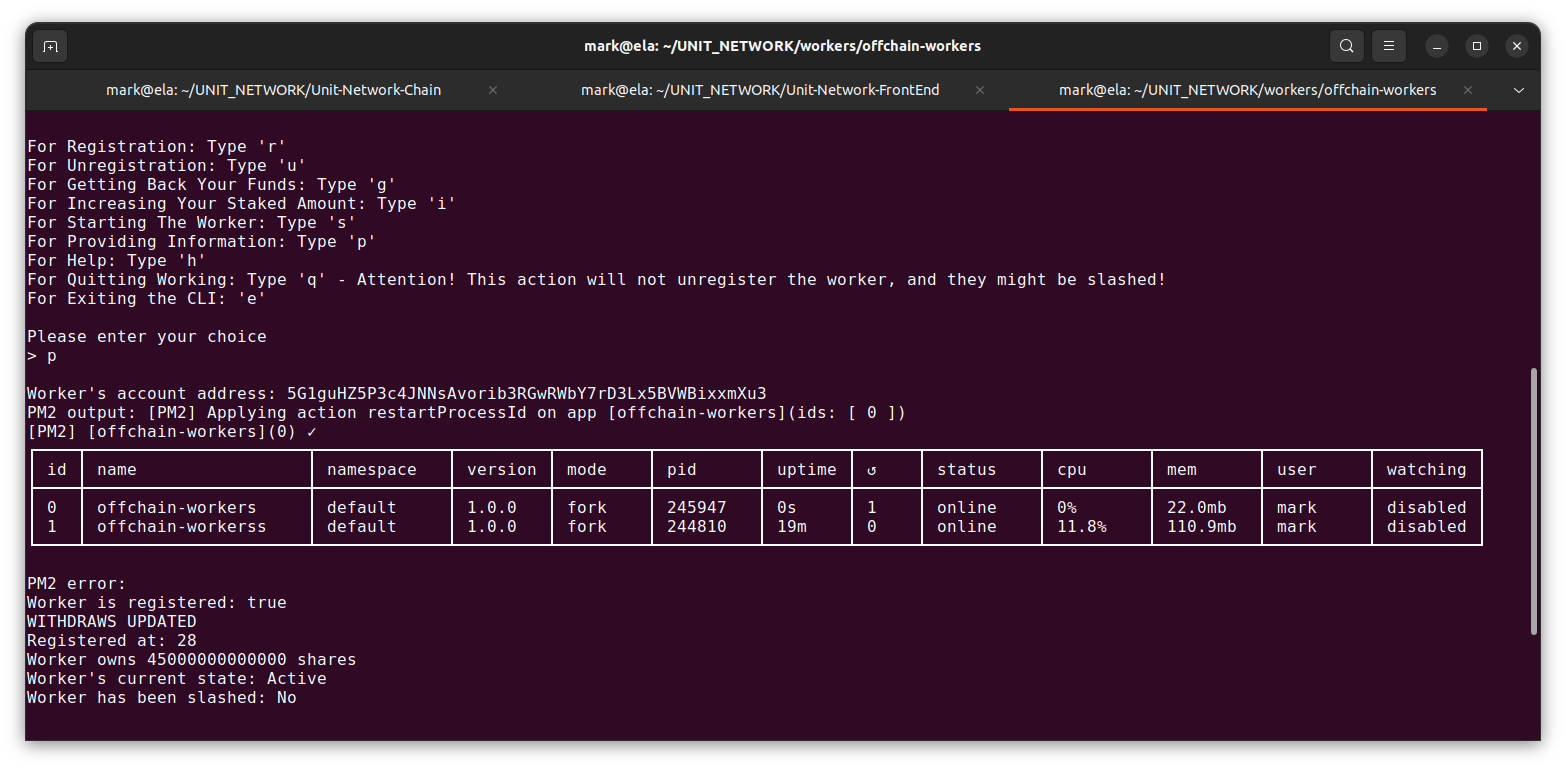
Command to exit the off-chain worker cli, without interrupting the running process of the worker:
> e
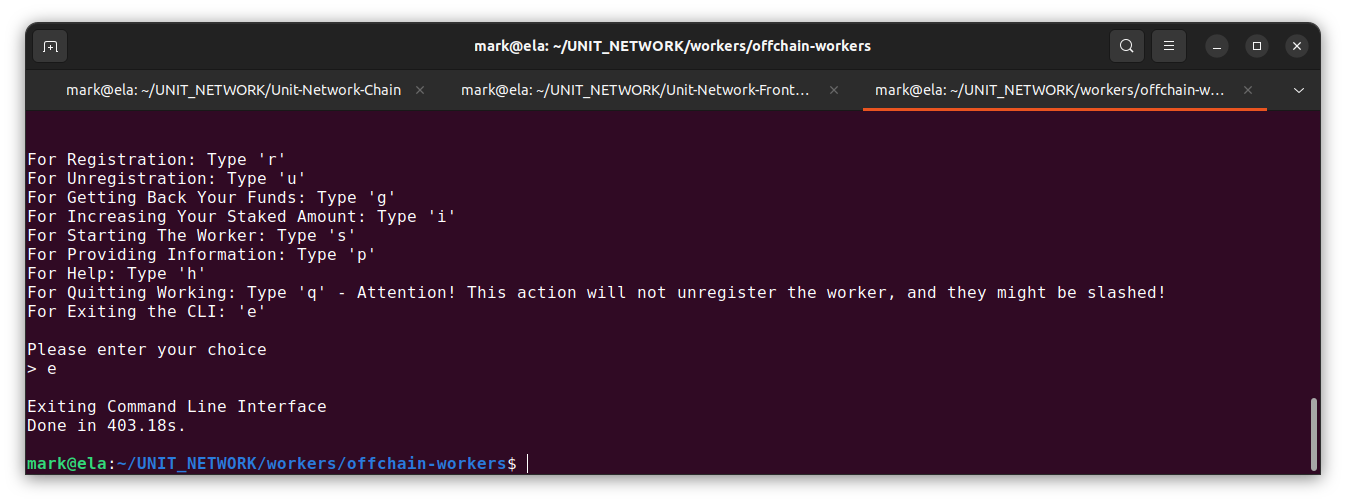
PM2 commands are executed outside the OCW CLI.
Command to see all Node.js apps being run with pm2.
pm2 list

Command to stop a running app. Get id from pm2 list.
pm2 delete <id>
Command to see console output from Node.js app in realtime.
pm2 log
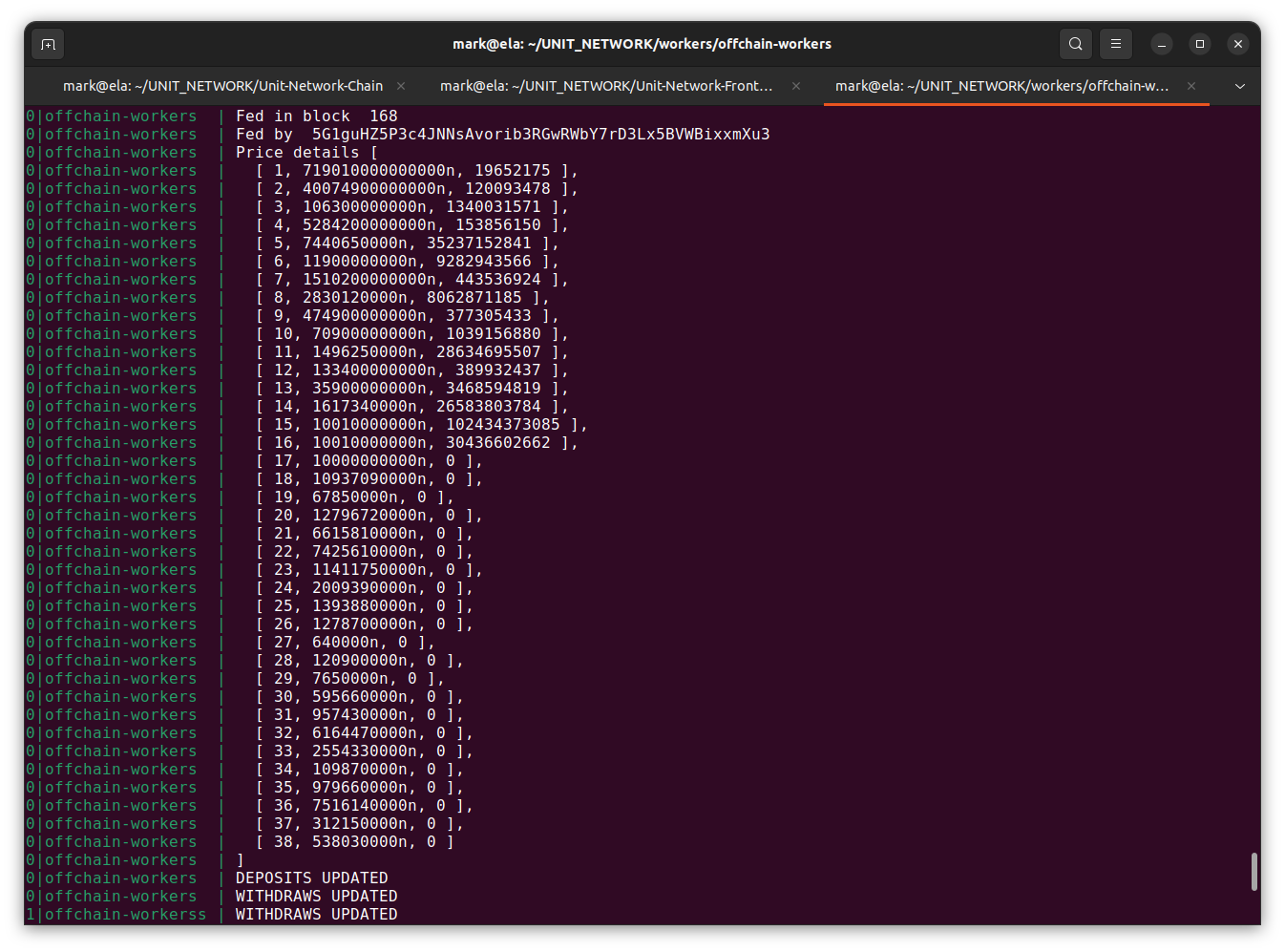
If your off-chain worker is working then you will see both price data in the logs and the following image.
The amount of crypto that can be deposited into the system depends on the Unit staking amount of the Deposit Workers.
It is necessary to initialize the exchange pool of the asset we want to withdraw; otherwise, the withdrawal process cannot be completed.
Additional CLI Functionalities
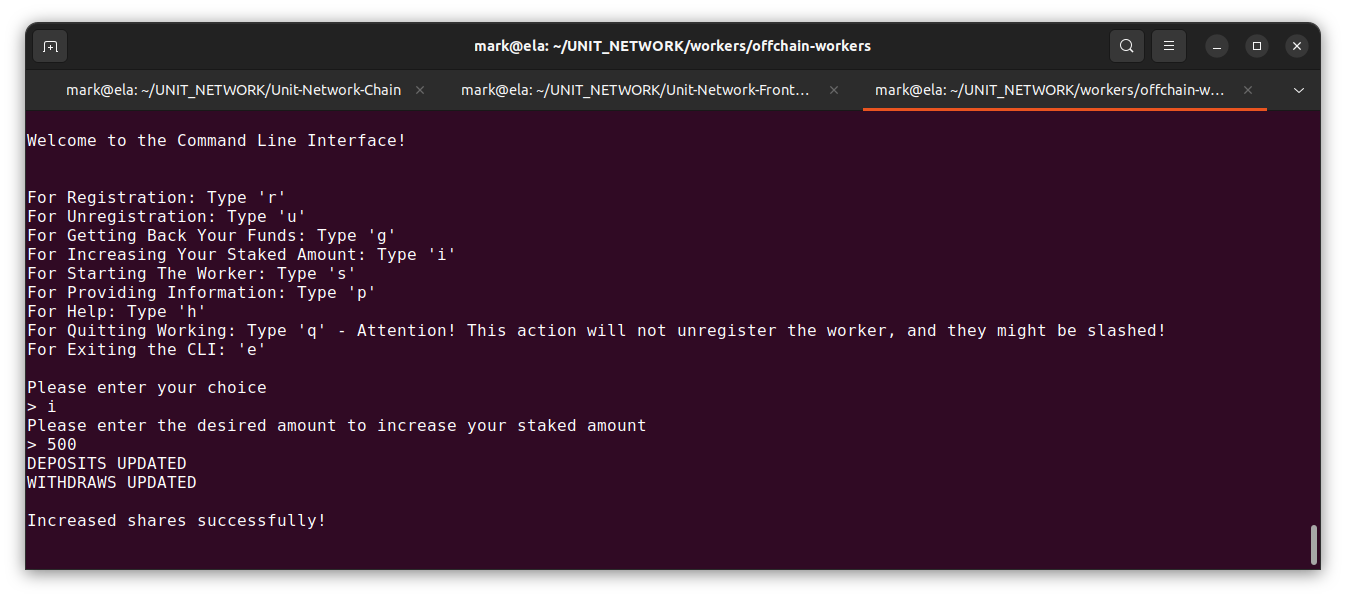
Command to increase shares, type i and enter the desired amount to increase the staked amount:
> i
Please enter the desired amount to increase your staked amount
> 500
Command to unregister, type u
> u
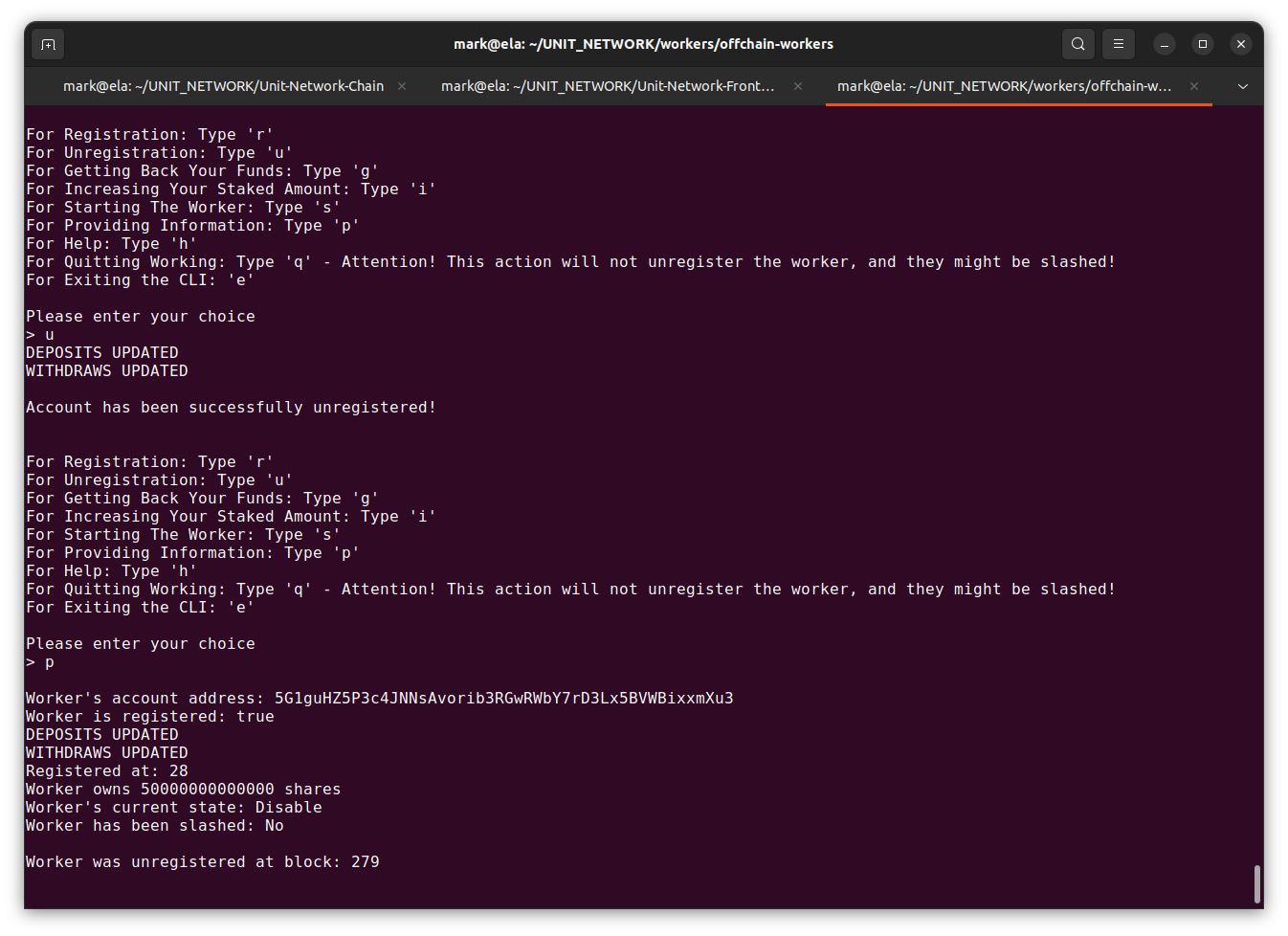
Note that the worker's state will be marked as Disable.
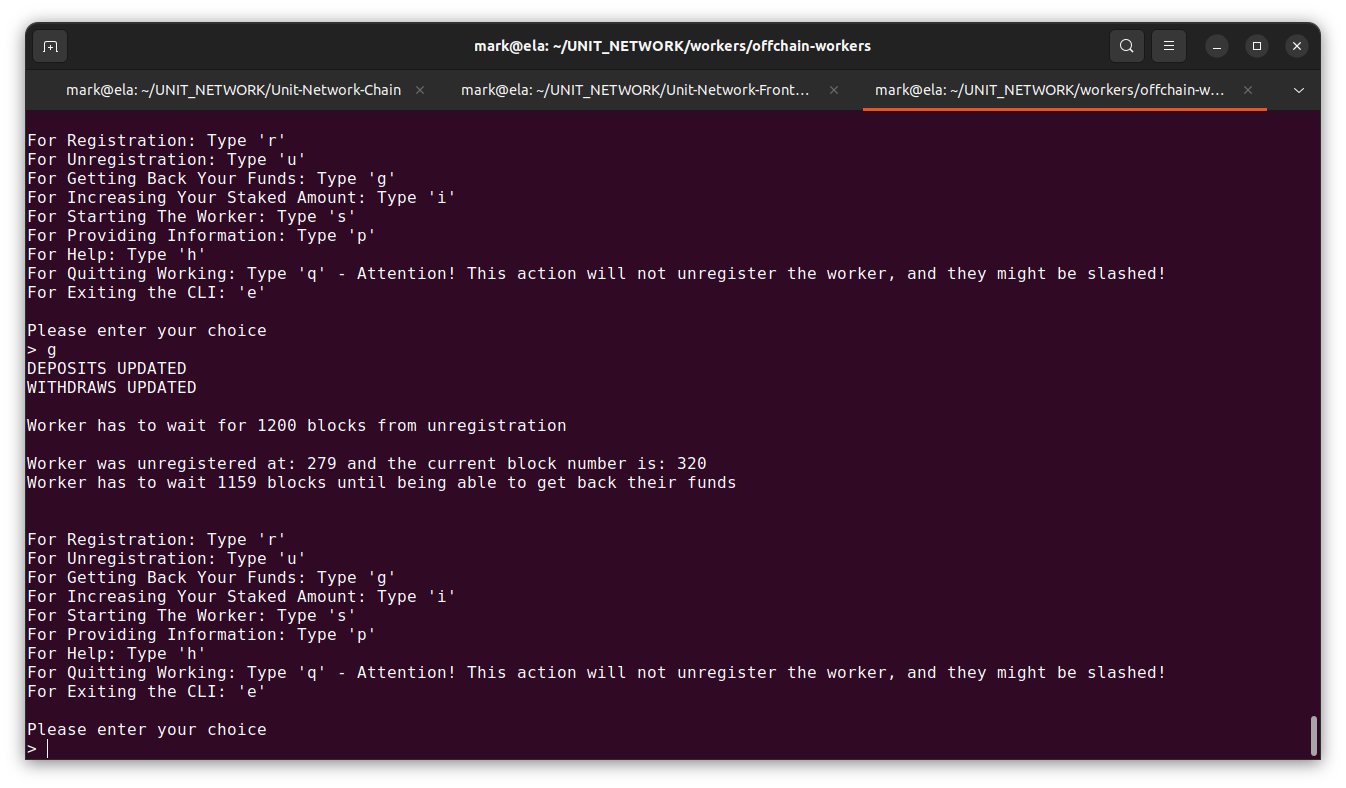
User won't get their staked amount back immediately, instead they have to wait 1200 blocks since their unregistration and request their funds using the following step.
Command to get back staked amount, type g
> g
Additional Notes
- Registration: Registers the user and initiates the PM2 process.
- Unregistration: Unregisters the user, stops the PM2 process, but doesn't delete it.
- Start: Starts the PM2 process.
- Quit: Stops the PM2 process.
- Exit: Exits the OFW CLI without interrupting the PM2 running process.
Dev Additional Setup
To run multiple processes simulating different workers, adjust the individual credentials in the .env file before starting the cli.
sudo nano .env
Include in the .env file the correct API endpoints, API keys and the credentials of the worker.
# Rename .env.example file to .env
# Complete the credentials used to login in UNIT Network
EMAIL=tester@test.com
PASSWORD=tester@test.com
PIN=tester@test.com
# Endpoint
# HOST=wss://Mozart.network
HOST=ws://127.0.0.1:9944
# Price API keys
# free coingecko api
# COINGECKO_API=https://api.coingecko.com/api/v3/coins/markets?vs_currency=usd&order=market_cap_desc&per_page=100&page=1&sparkline=false
# pro coingecko api
COINGECKO_API=https://pro-api.coingecko.com/api/v3/coins/markets?vs_currency=usd&order=market_cap_desc&per_page=100&page=1&sparkline=false&x_cg_pro_api_key=CG-Zx8NBankYcZefuKRjR539JUs
COINGECKO_PRICE_CHANGE_API =https://pro-api.coingecko.com/api/v3/simple/price/x_cg_pro_api_key=CG-Zx8NBankYcZefuKRjR539JUs
# CURRENCY_API=https://api.currencyapi.com/v3/latest?apikey=UAKucSCKNpcwU43kQWLliKno3NgpeV7HcLJt
CURRENCY_API=https://currencyapi.net/api/v1/rates?key=UAKucSCKNpcwU43kQWLliKno3NgpeV7HcLJt
CURRENCY_BEACON_API_KEY=IEa8irBhLoM2CsusaGi2UUlxD1Ib0w2H
EXCHANGE_RATE_API_KEY=37ebadb8694b29ee02f897bc
CRYPTO_COMPARE_API_KEY=3f728494c88212acfdad60d8ca8b91e1638aa92ba2cf58b5d2c193cb68d31dfb
COIN_MARKET_CAP_API_KEY=6214f8a3-f575-4922-84e9-eadbe0b3e4f2
# Transaction verifiers API keys
ETHERSCAN_API_KEY=7KT9JFYWU7UIGBUH4TV4QF21PTCE4W7UPN
MATIC_API_KEY=WAYUXRIMPVN3GY8ZH4HKUHPISYSJWXCIVG
BNB_API_KEY=F9DCZXPFXF66YMK4XEG9REDDPZJ1EG86NF
SOLANA_API_KEY=5b94ad40-8bbc-4c3e-9896-4b944f1ae995
To format all the files run the following script;
yarn run pretty
Multiple Off-Chain Workers Setup
Environment Setup
Pre-requisites: Follow steps of Environment Setup Section
Worker 1
Change directories to offchain-workers and create a .env file if one does not already exist.
sudo nano .env
Include in the .env file the correct API endpoints, API keys and the credentials of Worker 1.
# Rename .env.example file to .env
# Complete the credentials used to login in UNIT Network
EMAIL=tester@test.com
PASSWORD=tester@test.com
PIN=tester@test.com
# Endpoint
# HOST=wss://Mozart.network
HOST=ws://127.0.0.1:9944
# Price API keys
# free coingecko api
# COINGECKO_API=https://api.coingecko.com/api/v3/coins/markets?vs_currency=usd&order=market_cap_desc&per_page=100&page=1&sparkline=false
# pro coingecko api
COINGECKO_API=https://pro-api.coingecko.com/api/v3/coins/markets?vs_currency=usd&order=market_cap_desc&per_page=100&page=1&sparkline=false&x_cg_pro_api_key=CG-Zx8NBankYcZefuKRjR539JUs
COINGECKO_PRICE_CHANGE_API =https://pro-api.coingecko.com/api/v3/simple/price/x_cg_pro_api_key=CG-Zx8NBankYcZefuKRjR539JUs
# CURRENCY_API=https://api.currencyapi.com/v3/latest?apikey=UAKucSCKNpcwU43kQWLliKno3NgpeV7HcLJt
CURRENCY_API=https://currencyapi.net/api/v1/rates?key=UAKucSCKNpcwU43kQWLliKno3NgpeV7HcLJt
CURRENCY_BEACON_API_KEY=IEa8irBhLoM2CsusaGi2UUlxD1Ib0w2H
EXCHANGE_RATE_API_KEY=37ebadb8694b29ee02f897bc
CRYPTO_COMPARE_API_KEY=3f728494c88212acfdad60d8ca8b91e1638aa92ba2cf58b5d2c193cb68d31dfb
COIN_MARKET_CAP_API_KEY=6214f8a3-f575-4922-84e9-eadbe0b3e4f2
# Transaction verifiers API keys
ETHERSCAN_API_KEY=7KT9JFYWU7UIGBUH4TV4QF21PTCE4W7UPN
MATIC_API_KEY=WAYUXRIMPVN3GY8ZH4HKUHPISYSJWXCIVG
BNB_API_KEY=F9DCZXPFXF66YMK4XEG9REDDPZJ1EG86NF
SOLANA_API_KEY=5b94ad40-8bbc-4c3e-9896-4b944f1ae995
Open the CLI tool, use the following command:
yarn start
Register worker, type r and enter the initial amount to stake:
> r
Please enter the initial amount to stake
> 4500
Exit the off-chain worker cli, without interrupting the running process of the worker:
> e
View running processes with the following command
pm2 list
 ────┬────────────────────┬──────────┬──────┬───────────┬──────────┬──────────┐
│ id │ name               │ mode     │ ↺    │ status    │ cpu      │ memory   │
├────┼────────────────────┼──────────┼──────┼───────────┼──────────┼──────────┤
│ 0  │ worker1@test.com   │ fork     │ 2    │ online    │ 0%       │ 194.4mb  │
└────┴────────────────────┴──────────┴──────┴───────────┴──────────┴──────────┘
Worker 2
Note You can use the same terminal for setting up Worker 2 or a second terminal based on own preference.
Open .env file that you used for worker 1
sudo nano .env
Modify .env file to add Worker 2 credentials (email, password, pin)
# Rename .env.example file to .env
# Complete the credentials used to login in UNIT Network
EMAIL=tester@test.com
PASSWORD=tester@test.com
PIN=tester@test.com
# Endpoint
# HOST=wss://Mozart.network
HOST=ws://127.0.0.1:9944
# Price API keys
# free coingecko api
# COINGECKO_API=https://api.coingecko.com/api/v3/coins/markets?vs_currency=usd&order=market_cap_desc&per_page=100&page=1&sparkline=false
# pro coingecko api
COINGECKO_API=https://pro-api.coingecko.com/api/v3/coins/markets?vs_currency=usd&order=market_cap_desc&per_page=100&page=1&sparkline=false&x_cg_pro_api_key=CG-Zx8NBankYcZefuKRjR539JUs
COINGECKO_PRICE_CHANGE_API =https://pro-api.coingecko.com/api/v3/simple/price/x_cg_pro_api_key=CG-Zx8NBankYcZefuKRjR539JUs
# CURRENCY_API=https://api.currencyapi.com/v3/latest?apikey=UAKucSCKNpcwU43kQWLliKno3NgpeV7HcLJt
CURRENCY_API=https://currencyapi.net/api/v1/rates?key=UAKucSCKNpcwU43kQWLliKno3NgpeV7HcLJt
CURRENCY_BEACON_API_KEY=IEa8irBhLoM2CsusaGi2UUlxD1Ib0w2H
EXCHANGE_RATE_API_KEY=37ebadb8694b29ee02f897bc
CRYPTO_COMPARE_API_KEY=3f728494c88212acfdad60d8ca8b91e1638aa92ba2cf58b5d2c193cb68d31dfb
COIN_MARKET_CAP_API_KEY=6214f8a3-f575-4922-84e9-eadbe0b3e4f2
# Transaction verifiers API keys
ETHERSCAN_API_KEY=7KT9JFYWU7UIGBUH4TV4QF21PTCE4W7UPN
MATIC_API_KEY=WAYUXRIMPVN3GY8ZH4HKUHPISYSJWXCIVG
BNB_API_KEY=F9DCZXPFXF66YMK4XEG9REDDPZJ1EG86NF
SOLANA_API_KEY=5b94ad40-8bbc-4c3e-9896-4b944f1ae995
Open the CLI tool, use the following command:
yarn start
Register worker, type r and enter the initial amount to stake:
> r
Please enter the initial amount to stake
> 4500
Exit the off-chain worker cli, without interrupting the running process of the worker:
> e
View running processes with the following command
pm2 list
┌────┬────────────────────┬──────────┬──────┬───────────┬──────────┬──────────┐
│ id │ name               │ mode     │ ↺    │ status    │ cpu      │ memory   │
├────┼────────────────────┼──────────┼──────┼───────────┼──────────┼──────────┤
│ 0  │ worker1@test.com   │ fork     │ 0    │ online    │ 0%       │ 98.7mb   │
│ 1  │ worker2@test.com   │ fork     │ 1    │ online    │ 0%       │ 125.3mb  │
└────┴────────────────────┴──────────┴──────┴───────────┴──────────┴──────────┘
CLI Access
To access worker 1 CLI, modify the .env file with the corresponding credentials that was used to register worker 1. Open the CLI (yarn start) and have access to worker 1.
To access pm2 logs of worker 1, run pm2 log followed by the process id
pm2 log 0
To access worker 2 CLI, modify the .env file with the corresponding credentials that was used to register worker 2. Open the CLI (yarn start) and have access to worker 2.
To access pm2 logs of worker 2, run pm2 log followed by the process id
pm2 log 1
To access pm2 logs of all workers, run
pm2 log
0|worker1@test.com | Agreement given in block  9196
0|worker1@test.com | REACHED + ACCEPTED (Prices)
1|worker2@test.com | Fed in block  9200
1|worker2@test.com | Fed by  5Evhg2vB6QmRZWWNN25FXNGBLUtGJ1WDYdHaqEm5jptPWDWz
1|worker2@test.com | Price details [
1|worker2@test.com |   [ 1, 663550000000000n, 19672243 ],
Same process applies for additional workers.
Worker n
Follow the same steps as in section Worker 2 by using Worker n credentials (email, password and pin) in the .env file.
Open .env file
sudo nano .env
Modify .env file to use Worker n credentials (email, password, pin)
# Rename .env.example file to .env
# Complete the credentials used to login in UNIT Network
EMAIL=tester@test.com
PASSWORD=tester@test.com
PIN=tester@test.com
# Endpoint
# HOST=wss://Mozart.network
HOST=ws://127.0.0.1:9944
# Price API keys
# free coingecko api
# COINGECKO_API=https://api.coingecko.com/api/v3/coins/markets?vs_currency=usd&order=market_cap_desc&per_page=100&page=1&sparkline=false
# pro coingecko api
COINGECKO_API=https://pro-api.coingecko.com/api/v3/coins/markets?vs_currency=usd&order=market_cap_desc&per_page=100&page=1&sparkline=false&x_cg_pro_api_key=CG-Zx8NBankYcZefuKRjR539JUs
COINGECKO_PRICE_CHANGE_API =https://pro-api.coingecko.com/api/v3/simple/price/x_cg_pro_api_key=CG-Zx8NBankYcZefuKRjR539JUs
# CURRENCY_API=https://api.currencyapi.com/v3/latest?apikey=UAKucSCKNpcwU43kQWLliKno3NgpeV7HcLJt
CURRENCY_API=https://currencyapi.net/api/v1/rates?key=UAKucSCKNpcwU43kQWLliKno3NgpeV7HcLJt
CURRENCY_BEACON_API_KEY=IEa8irBhLoM2CsusaGi2UUlxD1Ib0w2H
EXCHANGE_RATE_API_KEY=37ebadb8694b29ee02f897bc
CRYPTO_COMPARE_API_KEY=3f728494c88212acfdad60d8ca8b91e1638aa92ba2cf58b5d2c193cb68d31dfb
COIN_MARKET_CAP_API_KEY=6214f8a3-f575-4922-84e9-eadbe0b3e4f2
# Transaction verifiers API keys
ETHERSCAN_API_KEY=7KT9JFYWU7UIGBUH4TV4QF21PTCE4W7UPN
MATIC_API_KEY=WAYUXRIMPVN3GY8ZH4HKUHPISYSJWXCIVG
BNB_API_KEY=F9DCZXPFXF66YMK4XEG9REDDPZJ1EG86NF
SOLANA_API_KEY=5b94ad40-8bbc-4c3e-9896-4b944f1ae995
Open the CLI tool, use the following command:
yarn start
Register worker, type r and enter the initial amount to stake:
> r
Please enter the initial amount to stake
> 4500
Exit the off-chain worker cli, without interrupting the running process of the worker:
> e
View running processes with the following command
pm2 list
┌────┬────────────────────┬──────────┬──────┬───────────┬──────────┬──────────┐
│ id │ name               │ mode     │ ↺    │ status    │ cpu      │ memory   │
├────┼────────────────────┼──────────┼──────┼───────────┼──────────┼──────────┤
│ 0  │ worker1@test.com   │ fork     │ 0    │ online    │ 0%       │ 101.5mb  │
│ 2  │ worker2@test.com   │ fork     │ 0    │ online    │ 0%       │ 135.2mb  │
│ 1  │ workern@test.com   │ fork     │ 0    │ online    │ 0%       │ 101.1mb  │
└────┴────────────────────┴──────────┴──────┴───────────┴──────────┴──────────┘